












































































Last year, two of my top-selling home goods listings on Amazon went dark for 11 days. The reason: “off-white background pixels.” A professional photographear had shot them on a white sweep, but the lighting cast a shadow so faint that only an eyedropper tool could detect it. Amazon’s automated checker found it instantly, suppressed the listings, and killed the Buy Box on two products generating steady revenue.
That experience made me take a hard look at whether AI Product Photography could produce Amazon-ready images that actually pass the platform’s technical review — and I needed AI Product Photography free online tool that understood not just what looks good, but what clears Amazon’s automated check on the first submission.
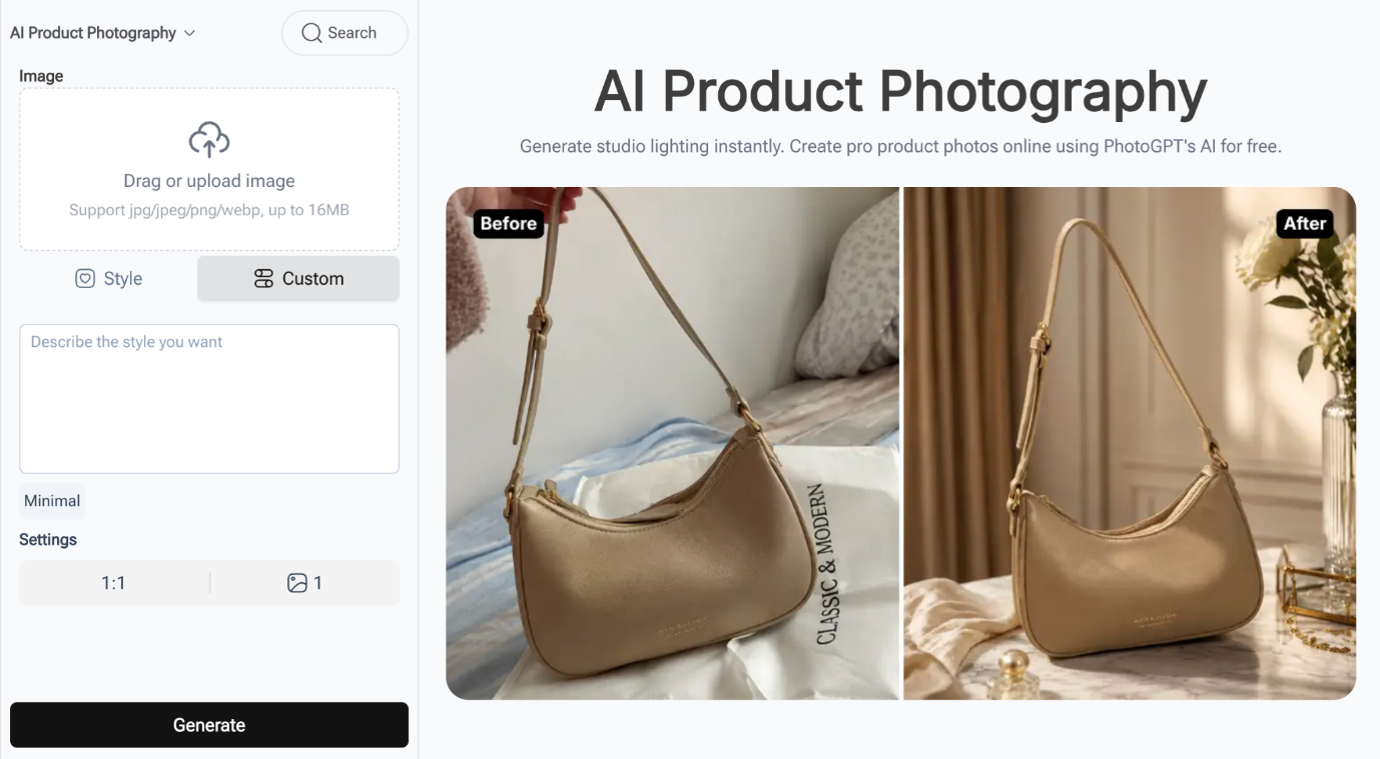
(AI Product Photography Featurepage on PhotoGPT)
What Amazon Actually Requires
The rules are not flexible. The main product image must have a pure white background at RGB 255,255,255 — not 254, not “close enough to white.” The product must fill at least 85% of the frame. No watermarks, no text overlays, no props not included with the purchase, no logos visible on packaging. Any single violation can trigger suppression and loss of Buy Box eligibility. Sales flatline within hours.
Professional Amazon photographers charge $50 to $200 per product for compliant shots. At 100 SKUs, that is $5,000 to $20,000 before a single unit sells. For sellers testing new products or operating on thin margins, the upfront cost alone can kill a product launch.
The Step-by-Step Workflow
Here is exactly how I generate compliant images, from upload to final Amazon submission.

(Product photos generated by PhotoGPT)
Upload and Set the Style
I tested PhotoGPT AI Product Photography across 30 products in my catalog — kitchen utensils, storage containers, desk organizers, electronics accessories. The tool accepts JPG, PNG, and WebP files up to 16MB. Drag your product photo in and it appears on the left side of the interface.
Now comes the key decision. The Style tab gives you preset scenes, and one of them — Pure White Studio — is purpose-built for Amazon compliance. Selecting it generates a product shot with a clean white background and professional lighting in one click. For most products, Pure White Studio produces images that pass Amazon’s automated check on the first try. It is the fastest path to a compliant main image.
For products with white elements where the Pure White Studio preset sometimes struggles — white ceramic mugs, glossy white packaging — I switch to the Custom tab and write a stricter prompt: “pure white background with RGB 255,255,255, product centered and filling at least 85 percent of frame, no shadows, no props, no text, product clearly visible against pure white background with subtle edge definition.”
Read Also: I Want Financial Freedom –Reijnders Admits Money Motivated Saudi Transfer
Review the Before/After
The tool shows the original and the generated result side by side immediately. This is where you catch issues before they reach Amazon. I check for three things: background purity (no gray bleed at edges), product edge clarity (especially for white items), and frame fill (product should occupy most of the image). If anything looks off, I adjust the prompt or try a different preset and regenerate.
The Pre-Upload Checklist
Before submitting any image to Amazon, I run through five checks. First, open the image in an eyedropper tool and sample the background in three spots — all must read RGB 255,255,255. Second, the product fills at least 85% of the frame. Third, zero shadows, even soft “professional” ones. Fourth, no stray text, logos, watermarks, or artifacts anywhere. Fifth, submit one test product first and wait for Amazon to clear it before batch-uploading the rest.
Out of 30 products tested with this workflow, 27 passed on the first upload. The 3 that failed were all dark-colored items where the AI slightly dimmed the background near edges. Switching to a stricter custom prompt resolved all three.
Fill the Remaining Image Slots with Lifestyle Scenes
Amazon allows up to 9 images per listing, and only the main image needs the strict white background. Slots 2 through 9 are for lifestyle context, size reference, and detail shots — and these drive more conversions than the compliant main shot ever will.
For secondary slots, I switch back to the Style tab and use the Lifestyle Scene preset. One click replaces the white background with a styled, natural setting that shows the product in context. For products that belong in specific environments, Clean Soft Studio or Kitchen Counter presets work well depending on the category.
After implementing the full nine-image approach with Pure White Studio for the main shot and Lifestyle Scene for the secondary slots, average conversion across the test batch moved from 8.9% to 9.4%. The main image gets the listing approved. The lifestyle images make the sale.
Conclusion
PhotoGPT (https://photogpt.io/ai-product-photography) handles the production side of Amazon image compliance efficiently. Sellers still need to verify against Amazon’s technical requirements — the tool is your image engine, not your compliance auditor. Used methodically with the checklist above and the right preset selection, it takes the time and cost out of keeping a large Amazon catalog properly imaged. For most sellers, that means more products live, more Buy Boxes held, and fewer midnight scrambles over suppressed listings.
Try AI Product Photography on PhotoGPT: https://photogpt.io/ai-product-photography